Thursday, November 28, 2019

New Starizona Night Owl Focal Reducer -- Updated

For some time I have used the combo 0.63x focal reducer(FR) and diagonal to achieve about an f/5 focal ratio with some rather distorted stars out to the edge of the ASI 294MC Pro with its 16x13mm sensor. Recently I procured a Starizona Nightowl FR which promises .. "to provide excellent image quality over a 16mm image circle." This is a bit of an over promise. Even near the 13mm dimension edge of the ASI294MC star distortion is quite evident; albeit less objectionable than the aforementioned 0.63x FR optical configuration. 

A bigger concern is uneven background vignetting. This is expected in any optical system which is why flat field correction is essential. However, in just my short experience with the Night Owl there is a small residual greenish glow  evident in the center of the Horsehead Nebula and NGC1981 images even after applying several flat fields acquired at different exposures. Imaging was from  a quite light polluted area, Frederick, Maryland and it's hoped a Orion SkyGlow Astrophotography Filter will help with this. Meanwhile here are a few early results. 

Update: Since this writeup almost all NightOwl images have been acquired at 3104x2116 or 3104x2844 pixel formats. At these formats flat frames are effective eliminating the residual greenish glow in the center of DSO images. I now do all NightOwl imaging at the 3104x2844 format. 

Barnard 33(Horse Head Nebula), NGC2023, 
NGC 2024(Flame Nebula)

Sharpless 279, NGC1981 

Recent and not so recent DSO images

These images were typically acquired using a Celestron 0.63x focal reducer with or without a diagonal. With the diagonal a non optimal F/4 focal ratio is achieved. With my typical straight through configuration with 108 mm gap between the focal reducer and the sensor yields ~F/6.3. Imager was ZWO ASI294MC-Pro @0C or 10C depending on ambient temperature.

Processing is with AutoStakkert for averaging subframes, Paintshop Pro X9 for image processing. In some cases the minimalist Fix app built into Window 10 Photo Gallery was used to tweak the image.

NGC 6960 - Western Veil Nebula

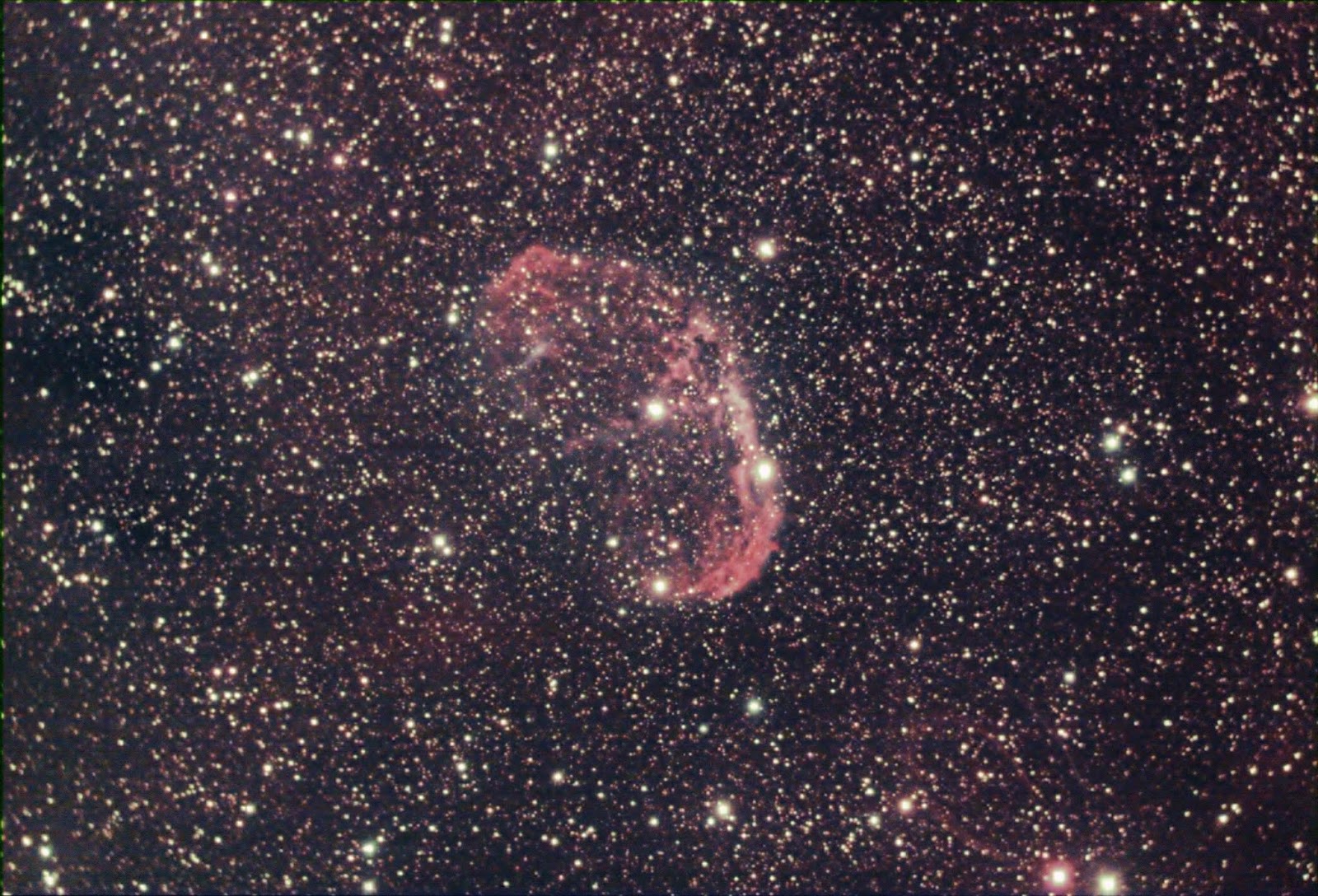
NGC6888 -Crescent Nebula

 ZWO ASI294MC Pro series of 180s exposures
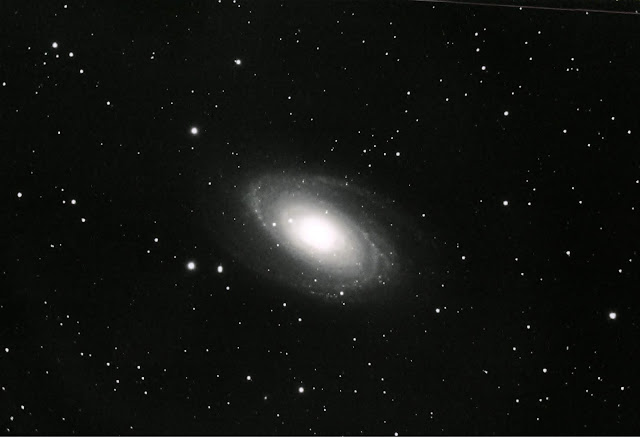
Messier 81- Bode's Galaxy
Planetary nebular: Average of 8x180s, ASI294MC Pro
Messier 27 - Dumbell Nebula
NGC6992 - Eastern Veil Nebula

ASI294MC Pro, 10x120s exposures
Messier 8 - Lagoon Nebula

ASI294MC Pro, series of 30s exposures
Messier 31- Andromeda Galaxy

ASI294MC Pro, Average of 15x60s exposures
Messier 16 - Eagle Nebula

ASI294MC Pro, 20x30s averaged.
Messier 17 Omega Nebula

Wednesday, May 15, 2019

Windows Live(TM) Gallery

April - May mid Atlantic clouds have been frustrating leaving me time to retrospectively play with past images. I often quick view images with Windows Live Gallery. What I had not noticed or played with until recently was the Fix function. Fix is a basic image processing app that lets you make quick adjustments brightness, contrast, color, tint, and saturation. Other functions are sharpening and noise reduction. I still do initial processing of the averaged image using Corel Paintshop Pro X9 . These five galaxies were touched up with the Windows Live(tm) Gallery Fix after initial processing with Paintshop Pro X9. Unfortunately galaxy season, when the Virgo and Coma galaxy clusters are prominent around 10 PM is passing fast. Fingers are crossed the last week of May when the moon is waning will bring some clear skies.

M101

M106

M94

M81

NGC2403


Wednesday, January 23, 2019

Back to the Moon

It's been a couple of years since I did any Solar System imaging with my focus on bettering my DSO imaging with ZWO imagers. The super low noise, sensitivity, cooling and high dynamic range have allow me to do DSO imaging even when the moon is in gibbous phases. I never really tried this with my old  uncool Meade DSI II Color camera. And with precious few nights in the USA northeast DSO imaging was prioritized at every opportunity. 

This time of year seeing in the Mid Atlantic States tends to be mediocre thanks to current the path of the jet stream favoring DSO imaging over more seeing sensitive  lunar and planetary imaging. Despite this I recently decided to pull out my trusty old Celestron NexImage5 Solar System Imager on a recent first quarter moon night. Seeing was only a 3 on Clear Sky Charts. 

The lunar images can be seen at this entry in my Solar System Imaging with Celestron NexImage5


Sunday, January 20, 2019

What I learned from post processing M42 in Paintshop Pro X9.

In my last posting I alluded to simplifying my post processing using M42 as an example. My goal has always been get a aesthetically pleasing image with as few steps as possible. 

I use Corel Paintshop Pro X9 (Standard).  In the past I would thrash around trying various aggressive histogram adjustments, color balance adjustments, brightness and contrast, curves and saturation adjustments. The result would be a history of many steps (often 10 or 12) that if saved as a script would not translate well to the next image. One thing all post processing had in common was my first step started with histogram stretch then histogram adjustment to bring out the faint areas. 

I have found, after applying a histogram stretch, I can apply a gentle histogram adjustment (Gamma: 1.3-1.5, Appearance: between -3 and -5) four to seven times to bring out the faint areas. These initial steps for  7x histogram adjustments were saved in a script that can easily be edited to change Gamma and Appearance values. I also selectively deleted histogram adjustment steps to give 4x and 6x scripts. 

After applying the histogram adjustment scripts I use white balance to eliminate the excessive green cast: more on this below.  The Curves dialog is adjusted to further adjust color balance and contrast to bring out faint nebulosity or the outer parts of galaxies. Color saturation and hue are more subjective and are applied case by case. 

Sunday, December 2, 2018

Getting to 0.63X part 2

I did manage to image M42 from the terrace at around 2AM with the filter in place and with a focal reducer sensor distance of 110mm. This configuration gives a 0.62x reduction. On a self induced downer I selected the 3104 pixel instead of 4144 pixel format thus robbing myself of knowing how well flattening occurs out to the farthest edge of the sensor. 

The processed image for an averaged series of 15s exposures follows. There is some coma evident in the stars in the upper right corner. However some star elongation due to guiding errors is also evident. Polar alignment on the terrace is fairly crude proving quite challenging to the auto-guider. 

M42

A note about post processing: This series of overnight M42 exercises has allowed me to greatly simplify my post processing. I use Paintshop Pro X9*. The above image was achieved in three or four steps with the first step a script that I will outline in the next post. 

* I recently upgraded to Paintshop Pro 2021. I'll talk about that in a future post.

Wednesday, November 28, 2018

Getting to 0.63X --- yes M42 again!

Until now I have been imaging at ~0.40X using the diagonal between the camera and the focal reducer or at ~ 0.72x using the adapters and spacers supplied with the ASI294MC-Pro along with the SCT threaded coupler from the diagonal. To get to actual 0.63x, presumably the optimal focal reduction for best field flattening the spacing between the focal reducer and the sensor needs to be about 106mm based on the calculation found here.

Luck would have it I happened to have an eyepiece projection camera adapter tube of just the right length and threading for a back plate opening. Unfortunately, because clouds were moving in I only had time for one round of 35 x 15s  shots with M42 still partly blocked by tree branches. Nonetheless the exercise was valuable. There's plenty vignetting that could be largely eliminated via flat frame correction. Also, because this was shot from my terrace tracking was sub-optimal despite the use of the auto-tracker.


Update: The camera adapter configuration in this above posting provides no provision for using a filter. Luckily, after a little experimentation I found a combination of adapters that can include a filter about halfway between the focal reducer and the sensor. In this configuration the sensor focal reducer spacing is about 110mm resulting in a 0.62x focal reduction. This setup still needs to be tested. Another M42 anyone? ;-)